MDaemon: Moving Public Folders to into another path or drive?
The following details how to move the Public Folders in MDaemon to a new path or drive:
1. Stop the MDaemon service in Windows Services Manager.
2. In Windows File Explorer, move the \MDaemon\Public Folders directory (default installation directory is C:\MDaemon\Public Folders) to the new location.
3. Open \MDaemon\App\MDaemon.ini in a text editor.
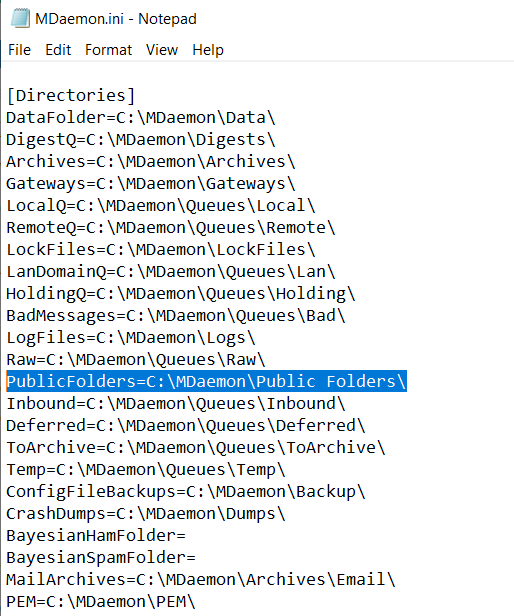
4. In the [Directories] section change the PublicFolders= folder path value so it reflects the new location:
5. Save and close the file.
6. Start the MDaemon service in Windows Services Manager.
Related Articles
Moving MDaemon to another machine and changing the install path
Sometimes it becomes necessary to move MDaemon to another machine and that machine does not have the same drive letter that the old machine did. If you follow the steps below you will be able to migrate this installation and also update any ...How do I move my MDaemon installation to a new drive on the same machine?
From MDaemon’s interface, choose Setup -> Preferences -> Windows Service -> Remove Service. Confirm that the service has disappeared from Start -> Settings -> Control Panel -> Administrative Tools -> Services (you may need to reboot your machine to ...MDaemon Connector: Why can’t I can’t see any contact or calendar folders?
Microsoft Outlook has several “folder” views. It’s therefore important that you don’t have the “mail” folder view option specified in your Outlook Connector enabled profile or all you will see are mail folders. In a new mail profile, Outlook defaults ...Move user mailboxes onto another drive
The steps below describe how to move user mailboxes to a different location on the MDaemon machine: 1. Stop the MDaemon service via the Windows Services Manager. 2. In Windows File Explorer, move the \MDaemon\Users folder to the new drive, but ...How do I move or copy an SSL certificate from one PC to another?
If you need to move a root trusted or self-signed SSL certificate from one Windows Machine to another this article will detail the process. In this example, we are moving a root trusted SSL certificate we purchased for www.zensoftware.co.uk to a new ...